


Circle Parental Controls App
2.2776.00 Reviews
App Specs
- Version
- 2.36.0.1
- Updated On
- License
- Free
- Downloads
- 100,000+
- Developer
- Aura Sub LLC
- Categories
- Parenting
- Platform
- Android
Screenshots

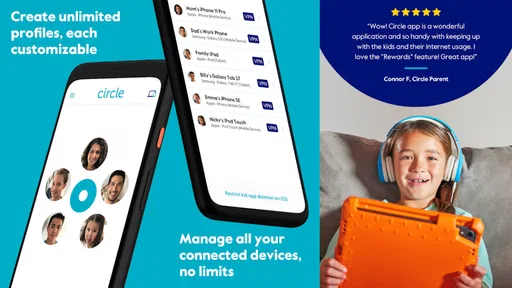
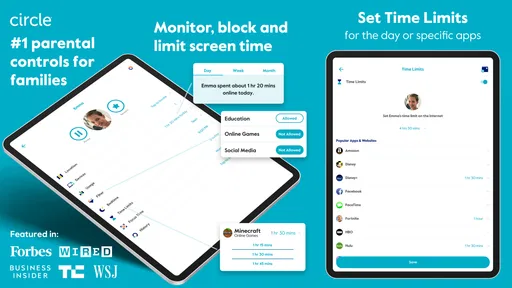
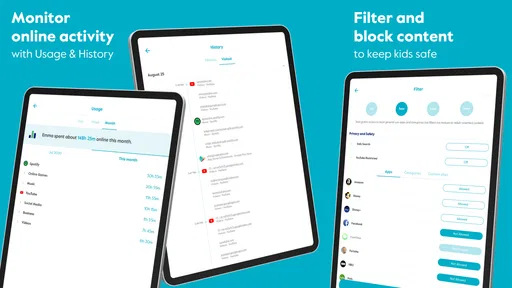
 Analysis by AppCompare
Keeping children’s screen habits on track is less about finding a magic switch and more about making boundaries clear enough to stick. I see Circle Parental Controls App as a tool for parents who want a central place to manage online access, rather than a substitute for conversations about what children do online. That distinction matters: controls can help structure a routine, but they work best when kids understand the rules behind them.
Where Circle fits today
Circle is a free parenting app from Aura Sub LLC, and its current Android release is version 2.34.0.1, for devices running Android 6.0 or later. It has an average rating of 2.3 from around 2,200 ratings, alongside roughly 766 written reviews, and has passed 100,000 installs. Those figures suggest a product with a real audience but mixed reactions, so I would treat it as something to test against your household’s needs, not assume it will suit everyone.
The app is listed for everyone, but the people making decisions with it are parents and caregivers. Its main appeal is bringing screen-time limits and access controls into a parenting workflow. That can be useful if your family needs predictable rules across a child’s digital routine; it is less compelling if you only want a one-off way to block a single site or set a basic bedtime reminder.
What the controls mean in practice
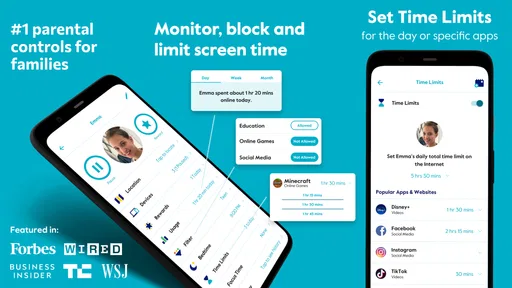
The original article describes setting time limits, filtering content, pausing internet access, setting a bedtime, and granting extra time as a reward. The practical value is not simply having each control available; it is choosing a small number of rules that match your child’s schedule. For example, a parent might use a bedtime boundary consistently and reserve extra time for an agreed exception, rather than changing limits whenever a disagreement starts.
Usage reports can also be a prompt for a calmer conversation. If a child is spending more time on a particular site than you expected, the useful next step is to ask what they use it for and decide together whether the routine needs adjusting. Reports are not a complete picture of a child’s interests or wellbeing, so I would avoid treating them as proof of a problem on their own.
What to consider before relying on it
Controls tied to a home network may be most useful when children are using devices at home. The original review notes that effectiveness can vary on mobile data or other Wi-Fi networks. That makes a simple household rule important: tell children which boundaries apply away from home, and do not assume a setting used in one network situation will cover every place they connect.
Compared with using built-in controls on each phone or tablet, Circle’s attraction is a more parent-focused way to organize limits and access. Built-in tools may be the better choice if you only need controls on one device or prefer to keep everything within the device’s own settings. Conversely, a family managing several devices or wanting a shared routine may find a dedicated parenting app easier to work with, provided its controls match the devices and connections they actually use.
Worth Reading Before You Choose

Flipboard Shows What News Apps Must Do Beyond the Feed

Switching to Android Auto Means Rethinking Your Driving Routine

Google Calendar Makes a Crowded Week Easier to Manage

Ludo King Makes the Most of the Minutes Between Plans

Baby Panda World Brings Quick Play to Modern Phones, but Its Game Library Feels Busy

ESPN’s Live Game View Makes Following Close Games Easier
There are trade-offs to weigh before making it part of family life. A strict block can interrupt homework, a video call, or another legitimate activity just as easily as it can end recreational browsing. I would agree on what happens when a child needs more time, and explain how to ask for an exception before an urgent moment arrives. That makes the app a support for a boundary, not the only way a family negotiates one.
There are also paid in-app purchases, priced from $9.99 to $89.99 per item, even though the app itself is free to install. I would check which controls are available for your intended setup before building a routine around them. If you are considering a purchase, first decide what problem you need to solve—bedtime, distracting apps, or a broader family rule—so the cost is judged against a specific need rather than a vague promise of more control.
Getting Started with Circle
The first thing I noticed about the Circle Parental Controls App is its super simple setup. I mean, it’s almost like the app was whispering, "Hey, I've got your back." You download it, follow a few straightforward steps, and boom, you're ready to go. The app syncs with your home network and devices seamlessly, so you don’t have to worry about a tech headache. Trust me, if I can do it, anyone can.
Main Features That Stood Out
Alright, let’s dive into what makes Circle a standout among parental control apps. First off, the ability to manage screen time is a lifesaver. You can set daily time limits for specific apps or even the entire device. So, if you don’t want your kids turning into zombies after a three-hour YouTube binge, Circle's got your back.
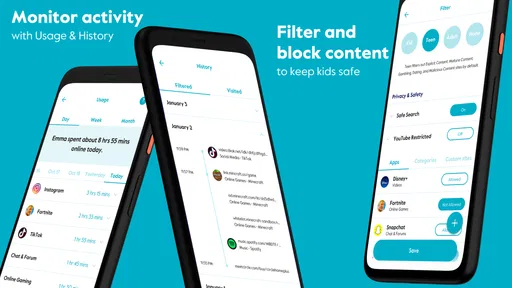
Another feature that I found incredibly useful is the filtering content option. You can filter what your kids can access based on their age. It’s like having a digital doorman who only lets in age-appropriate content. Plus, Circle updates its filter categories regularly, so you don’t have to keep checking for the latest inappropriate trends.
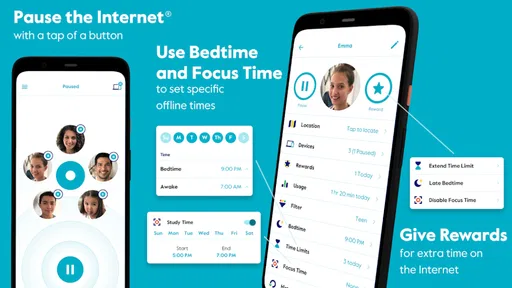
- Pause the Internet: This is a parent’s magic button. With one tap, you can pause the internet on any device. Dinner time has never been easier.
- Bedtime: Set a time when the internet takes a nap, ensuring your kids do too.
- Rewards: Need a little carrot to dangle? You can easily extend time limits or lift restrictions as a reward for good behavior.
Real-Life Benefits
Using Circle has genuinely been a breath of fresh air. Not only does it give me peace of mind, but it also fosters a healthier digital lifestyle for my kids. They’re more engaged during family time and less prone to throw a fit when screen time is up, thanks to the predictable limits I’ve set with Circle.
Additionally, the app provides insightful usage reports. It's like getting a sneak peek into your kid's digital habits. You get to see what sites they visit the most and how much time they’re spending on each. It’s an eye-opener, for sure.
Making the routine work
A realistic way to use the pause control is to make it a shared cue rather than a surprise punishment. For instance, if everyone agrees that devices are put aside during dinner, pausing access can reinforce the same expectation each evening. For a one-off need—finishing a school task, for example—the reward option gives a parent a way to make an exception without abandoning the regular limit altogether.
I would also start with one or two boundaries instead of trying to manage every online habit at once. A bedtime rule is easy to explain and observe; app-by-app limits may need more discussion because the same app can be used for recreation, schoolwork, or keeping in touch with family. Reviewing the routine after a few days can reveal whether a limit is genuinely helping or merely creating unnecessary friction.
Who is likely to benefit
I think Circle is best suited to caregivers who want a visible structure for home internet habits and are comfortable explaining that structure to their children. It may be particularly useful when a family is trying to make screen access more predictable, rather than negotiating from scratch each time a device comes out. A shared household routine can also help adults apply the same expectations instead of one parent enforcing a limit while another routinely overrides it.
It is not the right fit for every family. If the main concern is a child’s device use away from home, the network caveat deserves extra attention. If you only need a basic bedtime setting on one device, the built-in parental controls may be simpler and avoid adding another service to manage. And if your child is old enough to manage their own schedule, a direct conversation and agreed device settings may work better than a tightly controlled system.
Questions worth settling at home
Before relying on Circle, I would ask: which devices and connections are part of the routine, what should happen when a limit interrupts something important, and who is allowed to approve extra time? Answering those questions first makes setup more purposeful. It also helps avoid the common trap of turning every blocked minute into a negotiation between parent and child.
Parents may also wonder whether a content filter can replace supervision. I would not treat it that way. Filtering can help narrow access, but it cannot understand the full context of every site or replace an age-appropriate discussion about privacy, strangers, or upsetting material. The strongest use is as one layer in a broader approach, with adults staying available when children have questions.
My Personal Take
Honestly, I can't imagine going back to the days before Circle. It’s like having a digital co-parent who’s always on duty. Sure, there’s a bit of a learning curve, especially if you’re not tech-savvy, but the support and resources available make it a breeze to master.
One thing to keep in mind is that while Circle works wonders at home, its effectiveness varies when your kids are on mobile data or other Wi-Fi networks. But hey, no tool is perfect, right?
Overall, Circle Parental Controls App is a solid investment for any parent looking to create a safe digital environment for their children. It’s user-friendly, comprehensive, and, honestly, a bit of a sanity saver.
Give it a whirl, and you might just find yourself wondering how you ever managed without it.
What I would watch over time
With version 2.34.0.1 as the current release, I would focus less on expecting a particular new capability and more on whether the controls continue to fit the family’s actual devices and routines. A version number tells me which release is current; by itself, it does not tell me what has changed or guarantee that every setup behaves the same way. Existing users should check that their limits still reflect current school, sleep, and weekend schedules rather than assuming old settings remain sensible forever.
I would also pay attention to the balance between consistency and flexibility. If children regularly need exceptions for homework or family plans, a rule may need adjusting rather than repeated overrides. If restrictions are rarely used because they are too broad, narrowing them can make the tool feel fairer and easier to maintain. The point is not to maximize control, but to make the agreed boundaries understandable and workable.
My overall view is that Circle can help parents turn a vague intention—less late-night browsing, for example—into a routine that is easier to apply. Its usefulness depends on how much of a child’s access falls within the network and devices the family can manage, and on whether parents are willing to pair limits with conversation. I would try it for a specific household problem, review how it affects everyday life, and keep it only if it makes that problem easier to handle.
Pros
- User-friendly interface for easy setup.
- Comprehensive content filtering options.
- Customizable time limits for device use.
- Real-time location tracking of devices.
- Supports multiple devices and platforms.
Cons
- Limited features in free version.
- Occasional app performance lag.
- Subscription can be costly long-term.
- Requires stable internet for optimal use.
- May not support all device types.
FAQs for Circle Parental Controls App
What is Circle Parental Controls App and how does it work?
Circle Parental Controls is a comprehensive app designed to help parents manage and monitor their children's online activities. It allows you to set screen time limits, filter content, and track internet usage across all connected devices. The app provides peace of mind by helping parents enforce digital boundaries and encouraging healthier online habits.
Is Circle Parental Controls compatible with all devices?
Circle Parental Controls is compatible with both Android and iOS devices. It can also manage online activity across various devices connected to your home Wi-Fi network, such as tablets, phones, and computers. However, compatibility may vary with certain routers, so it’s advisable to check the app’s official compatibility list before downloading.
What features does Circle Parental Controls offer?
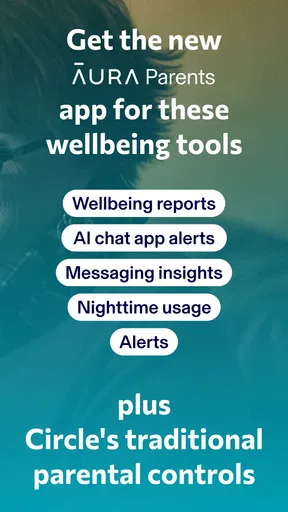
Circle Parental Controls offers a range of features including screen time management, content filtering, and usage tracking. Parents can set daily time limits for apps or websites, pause internet access, and filter inappropriate content based on age groups. Additionally, it provides detailed reports on online activity, helping parents stay informed about their children's digital behavior.
Are there any costs associated with using Circle Parental Controls?
Circle Parental Controls offers both free and premium plans. The free version includes basic features like screen time management and content filtering. For more advanced options, such as usage reports and location tracking, users can opt for a subscription plan. Prices for the premium version vary, so it's best to check the latest pricing on the app's website or app store.
How secure is my family's data with Circle Parental Controls?
Circle Parental Controls prioritizes user privacy and data security. The app uses encryption to protect personal information and adheres to strict privacy policies. Circle does not sell or share personal data with third parties, ensuring your family's online activity remains confidential. It's always recommended to review the app’s privacy policy for detailed information on data handling.


